top

Effortlessly Withdraw Funds from Your QRPay Account

Manage your money with ease by withdrawing funds directly from your QRPay account to your bank or card. Our secure and fast transfer options ensure that your money is accessible when you need it, anytime, anywhere.

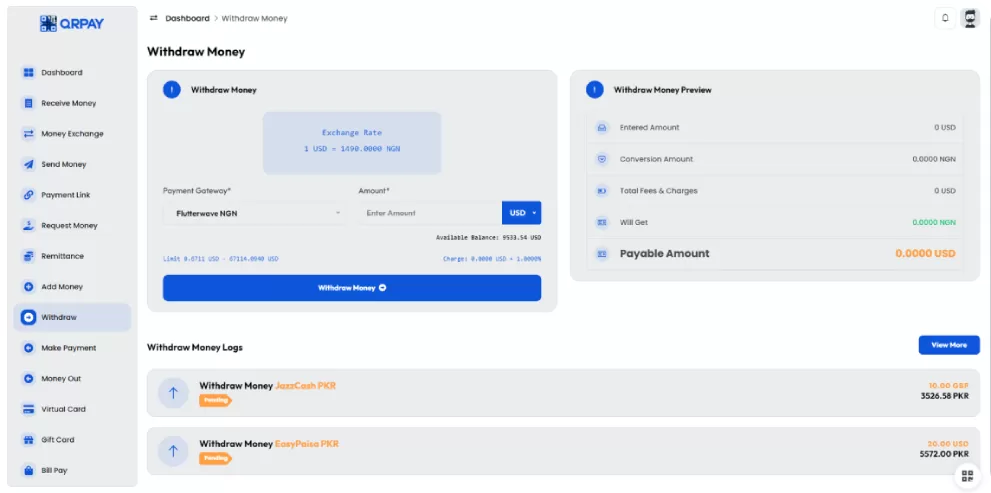
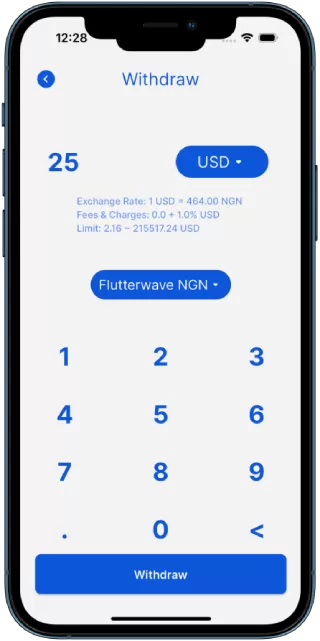
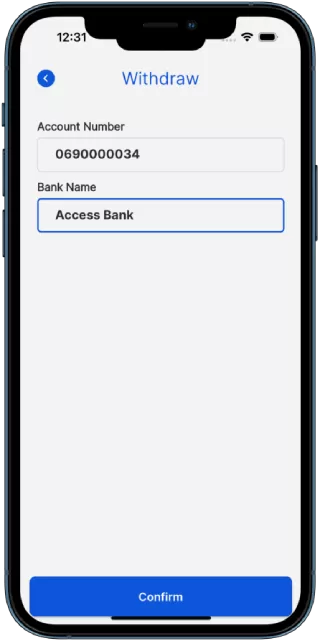
    Here are 3 simple steps for Withdraw money with QRPay:
  • 1.Log in to your QRPay account and choose the 'Withdraw Money' option from the menu.
  • 2. Select your preferred withdrawal method, such as a bank account or card, and enter the amount you wish to withdraw.
  • 3. Review the details, confirm the transaction, and your money will be transferred securely to your chosen account.
img

Follow these simple steps to easily and securely add funds to your QRPay account in just minutes. Whether you’re topping up for everyday payments or a specific transaction.

Frequently Asked Questions

An FAQ section typically contains a list of questions and their corresponding answers.

How do I Withdraw money using QRPay?

Log into your QRPay account, select the "Withdraw Money" option, enter the recipient’s details, choose the amount, and confirm the transaction.

Can I Withdraw money internationally with QRPay?

Yes, QRPay supports international money transfers. You can Withdraw money to recipients in different countries using multiple currencies.

What payment methods can I use to Withdraw money?

You can Withdraw money using funds from your QRPay balance, linked bank accounts, or credit/debit cards.

Is there a fee for Withdraw money?

Yes, a small fee may apply depending on the transfer amount and destination. The fee will be displayed before you confirm the transaction.

What should I do if my money transfer fails?

If a transfer fails, check your payment details and account balance. If the issue persists, contact QRPay customer support for assistance.

How long does it take for the recipient to receive the money?

Most transactions are processed instantly, but international transfers may take a few minutes to a few hours depending on the recipient's location and payment method.